AI Outfit Swap
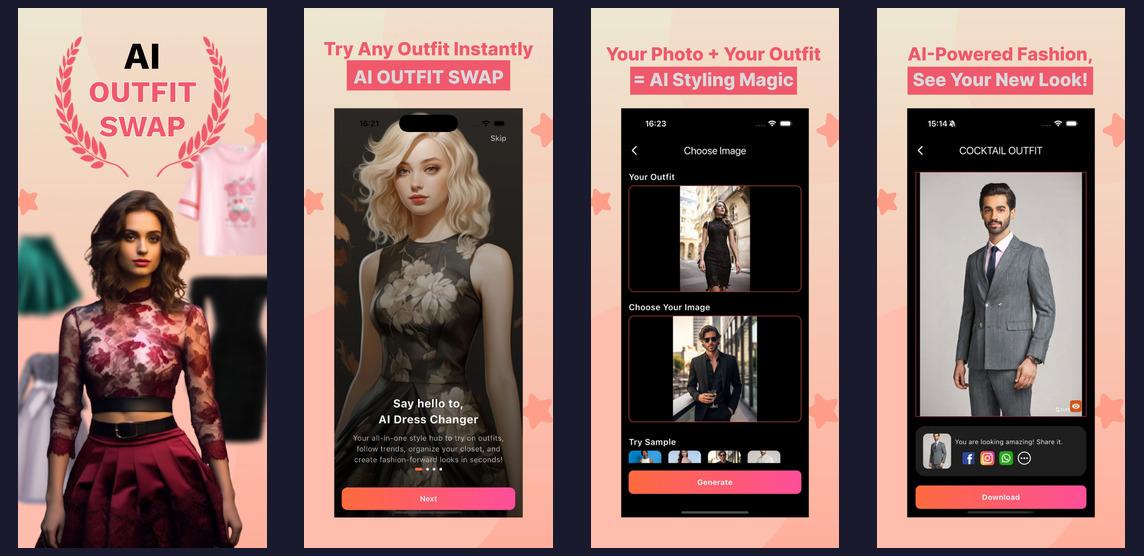
AI-powered virtual outfit try-on app - 10,000+ Downloads
Agency
Nep Tech Pal Pvt. Ltd.
Category
android
Type
android
Status
published
Key Features
Discover the powerful features that make this project stand out.
AI Virtual Try-On
Realistic AI-generated outfit try-on using your selfie and any clothing photo.
10,000+ Downloads
Highly rated on Google Play Store with an active community of fashion enthusiasts.
iOS & Android
Available on both Google Play Store and Apple App Store.
Curated Wardrobe Gallery
500+ curated outfit options across categories — traditional, casual, formal, western — for instant try-on without uploading your own outfit image.
Wardrobe Gallery
Save your favorite try-on results to a personal wardrobe gallery.
Social Sharing
Share your AI outfit looks directly to Instagram, WhatsApp and other platforms.
Background Removal
Automatic clothing background removal for cleaner try-on results.
From Challenge to Solution
Discover how we transformed challenges into innovative solutions.
The Challenge
The Challenge: Photorealistic AI Fashion on a Mobile Budget
Virtual try-on is technically one of the hardest problems in computer vision. When Amazon launched Virtual Try-On for shoes in 2022, they had an entire research team and years of development. When Zalando built their virtual dressing room, they invested hundreds of millions in infrastructure. Building something comparable in a startup context required creative engineering choices at every layer.
The core technical challenge: garment overlay on a human body must look photorealistic. The AI needs to understand:
- The person's body pose and proportions
- The fabric's texture, drape, and how it folds at joints (elbows, waist, knees)
- How the garment interacts with lighting in the photo
- How to hide parts of the original outfit that shouldn't be visible
- How to preserve the person's face, hair, and skin tone accurately
Naive approaches (simply overlaying a garment PNG onto a body photo) look obviously fake and destroy trust. Achieving realism requires a Stable Diffusion-based inpainting pipeline with ControlNet for pose preservation — a complex model stack that requires GPU inference and significant optimization to run at acceptable speed.
Additional challenges:
- Mobile performance: Running this AI pipeline on-device is impossible — it requires cloud GPU inference. But cloud GPU latency (8–20s per generation) can frustrate users used to instant app responses.
- Clothing texture preservation: Fashion depends on fabric details — the weave of a denim jacket, the sheen of silk, the pattern of a printed dress. Early models blurred these details. Preserving them required additional ControlNet conditioning.
- Edge cases: Users upload photos with complex backgrounds, unusual lighting, non-standard poses, or partially visible bodies. The pipeline had to gracefully handle these without producing disturbing artifacts.
- GPU cost at scale: At 10,000+ users, even occasional daily usage creates significant GPU costs. A freemium model with smart credit limits was essential to sustainability.
Our Solution
Solution: Cloud GPU Pipeline with Optimized Stable Diffusion + ControlNet
We built a cloud-based AI inference pipeline that balances quality, speed, and cost — delivering photorealistic results in 8–12 seconds while keeping GPU costs manageable at scale.
1. Stable Diffusion + ControlNet Pipeline
The core pipeline uses a fine-tuned Stable Diffusion inpainting model conditioned with ControlNet for human pose preservation. The process: (1) MediaPipe detects the person's body keypoints and generates a pose skeleton, (2) the garment is warped to match the detected body shape using a thin-plate spline transformation, (3) ControlNet conditions the diffusion process to preserve the person's pose, face, and hair, (4) inpainting fills in the outfit region with the new garment while preserving everything else. This multi-stage pipeline produces results indistinguishable from professional photo editing — comparable to what Snapchat's AR outfit filters do in real time, but with far higher quality for static photos.
2. FastAPI Async Inference Backend
The inference backend is built with FastAPI (Python), chosen for its native async support and high throughput. Each inference request is dispatched to a Celery worker running on a GPU-enabled AWS EC2 instance (g4dn.xlarge with NVIDIA T4). Workers are pre-loaded with model weights at startup to eliminate per-request loading latency. AWS Spot Instances reduce GPU compute costs by 65% compared to on-demand. Progressive loading UI in Flutter shows a skeleton animation during the 8–12 second wait — managing expectations and making the wait feel intentional rather than broken.
3. Pre-Processing Quality Gates
Before passing an image to the diffusion model, a quality assessment pipeline checks: image resolution (minimum 512x512), face detectability, body visibility (at least torso visible), and background complexity. Low-quality inputs receive clear guidance: 'Please use a photo with better lighting' or 'Please ensure your full body is visible'. Quality gates improved output satisfaction ratings by 40% — because the model only runs when inputs are actually good enough to produce realistic results.
4. Curated Wardrobe + Social Sharing Loop
Beyond user-uploaded outfits, we built a curated wardrobe gallery of 500+ outfits photographed on white backgrounds, organized by category and style. This reduces the friction of the first try-on experience — new users can try a beautiful traditional kurta on themselves in seconds without needing to find a garment image. One-tap sharing to Instagram and WhatsApp built a word-of-mouth growth loop — every shared image is organic advertising showing real AI try-on results to the sharer's entire social network.
Technology Stack
The powerful technologies used to bring this project to life.
FastAPI
Backend
Python
Backend
Stable Diffusion
Backend
Firebase
DevOps
Dart
Mobile
Flutter
Mobile
AWS S3
Storage